

An internet-facing remote access gateway does not need a stolen password to become the entry point for a ransomware attack.
Since the beginning of 2026, Arctic Wolf has investigated several intrusions involving affiliates of the Anubis ransomware operation. Initial access generally fell into two categories: the use of valid VPN credentials and the exploitation of remote vulnerabilities, including CVE-2025-5777, better known as CitrixBleed 2.
The vulnerability affects certain customer-managed NetScaler ADC and NetScaler Gateway appliances. It allows an unauthenticated attacker to retrieve fragments of memory that may contain authentication cookies, session tokens and SAML-related data.
When usable session material is recovered, the attacker may be able to impersonate an already authenticated user. No password needs to be guessed, and no new MFA challenge necessarily needs to be completed.
From there, Anubis affiliates have been observed abusing legitimate remote administration tools, native Windows utilities and outbound tunnels to move through victim environments while blending into activity that could initially resemble normal IT operations.
The defensive lesson is clear: the most valuable detection window appears before encryption, when session anomalies, remote management software, credential access and movement towards critical infrastructure begin to converge.
Executive summary
- CVE-2025-5777 is a critical out-of-bounds memory read vulnerability affecting certain NetScaler ADC and NetScaler Gateway configurations.
- Exploitation does not require prior authentication.
- Leaked memory may contain valid session material that can be reused to hijack authenticated sessions.
- This can result in a practical MFA bypass because the attacker inherits a session that has already completed authentication.
- CISA added CVE-2025-5777 to its Known Exploited Vulnerabilities catalogue on 10 July 2025.
- Arctic Wolf has identified exploitation of CitrixBleed 2 in ransomware intrusions associated with Anubis affiliates.
- The attackers have abused legitimate RMM products such as ScreenConnect, Zoho Assist, MeshAgent, Remotely and UltraVNC.
- Patching the appliance does not invalidate every session token that may have been stolen before the update.
- Organisations must patch, terminate active sessions and investigate activity during the period of exposure.
What is CitrixBleed 2?
CVE-2025-5777 is an out-of-bounds memory read vulnerability caused by insufficient input validation in NetScaler ADC and NetScaler Gateway.
According to Citrix security bulletin CTX693420, it affects customer-managed appliances configured as:
- a VPN virtual server;
- an ICA Proxy;
- a Clientless VPN or CVPN;
- an RDP Proxy;
- an AAA virtual server.
Citrix assigned the vulnerability a CVSS 4.0 base score of 9.3, placing it in the critical severity range.
The vulnerability can be triggered by sending a specially crafted HTTP POST request to the following authentication endpoint:
/p/u/doAuthentication.do
When the authentication handler processes an incomplete or malformed login parameter, the appliance may return uninitialised memory instead of correctly initialised data.
That memory can contain information associated with legitimate activity on the appliance, including:
- authentication cookies;
- session tokens;
- usernames;
- SAML context;
- request data;
- administrative session material.
Not every request will necessarily disclose a usable session. An attacker may have to repeat the request and analyse the returned data until valuable material appears.
The crucial point is that the vulnerability can be triggered remotely and without an account.
Splunk’s technical analysis provides a detailed explanation of the CitrixBleed 2 exploitation and detection process.
Why the name CitrixBleed 2 matters
The name is a reference to the original CitrixBleed vulnerability, CVE-2023-4966.
That vulnerability was also used to extract session material from Citrix appliances and hijack authenticated sessions. It demonstrated that an attacker does not always need to steal a password or defeat MFA directly. A valid session token may be just as valuable.
CitrixBleed 2 repeats the same fundamental lesson:
Authentication is not the end of the security decision. The session created after authentication must also be protected.
This is the same principle behind adversary-in-the-middle attacks against cloud identities. In those attacks, the objective is not simply to capture a password. It is to obtain the token or cookie issued after the user has successfully completed authentication.
We explain this attack model in more detail in our analysis of Microsoft 365 account takeover through AiTM phishing and token theft.
How CitrixBleed 2 can bypass MFA
Multi-factor authentication protects the login process by requiring the user to provide more than one form of verification.
However, most applications do not repeat the full MFA process for every request. Instead, they issue a cookie or token that tells the service that the user has already authenticated.
If an attacker obtains that token, the service may treat the attacker as the legitimate user.
The attacker has not technically broken MFA. They have bypassed the need to invoke it again by reusing the result of an earlier successful authentication.
This distinction matters because deploying additional MFA prompts alone does not solve the underlying problem. Organisations must also control the lifecycle of authenticated sessions.
That includes:
- limiting session duration;
- requiring reauthentication for sensitive actions;
- detecting changes in IP address, geography, device or user agent;
- identifying simultaneous use of a session from incompatible locations;
- maintaining the ability to revoke sessions quickly;
- terminating sessions after critical vulnerabilities are remediated.
MFA remains essential. CitrixBleed 2 does not make it ineffective. It shows why MFA must be combined with secure session management, identity analytics and behavioural detection.
How Anubis affiliates are using CitrixBleed 2
On 30 June 2026, Arctic Wolf published new research into the tools and techniques used in Anubis ransomware intrusions.
Across the incidents reviewed, initial access generally involved either:
- valid VPN credentials; or
- exploitation of remote vulnerabilities such as CitrixBleed 2.
This does not mean that every Anubis intrusion begins with CVE-2025-5777.
Anubis operates as a ransomware-as-a-service ecosystem. Different affiliates may use different access brokers, infrastructure, tools and intrusion procedures. Arctic Wolf therefore describes its findings as a collection of affiliate-level tradecraft rather than the behaviour of a single uniform operator.
Nevertheless, several common patterns emerged:
- access originating from VPS or hosting infrastructure;
- abuse of legitimate VPN and remote access services;
- hands-on-keyboard activity;
- credential discovery and credential dumping;
- lateral movement through RDP and SMB;
- remote execution using tools such as PsExec;
- deployment of multiple RMM products;
- access to domain controllers and Remote Desktop Services servers;
- targeting of hypervisors, NAS devices and systems close to backups;
- use of cloud services for data exfiltration;
- attempts to establish alternative outbound channels.
In some incidents, the attackers attempted to use cloudflared, authenticated proxies or SSH-based SOCKS tunnels to maintain access without exposing a new inbound service.
Arctic Wolf also notes that, in at least one investigated case, the available evidence did not confirm that the attempted Cloudflare tunnel became operational. That distinction is important: the presence or execution of a tool does not always prove that the attacker successfully used it.
Did CitrixBleed 2 cause all 91 Anubis victims?
No evidence supports that conclusion.
Public ransomware trackers reported that Anubis had listed 91 organisations on its data leak site by early July 2026. However, leak-site entries are claims made by a criminal organisation, not independently validated incident reports.
They may include:
- confirmed intrusions;
- unconfirmed claims;
- organisations added or removed during negotiations;
- attacks performed through different initial access methods;
- incidents involving different affiliates.
Arctic Wolf’s report stated that Anubis had claimed up to 83 victims at the time its research was prepared. Subsequent tracking increased that figure to 91.
The defensible conclusion is therefore:
Anubis has claimed 91 victims overall, while CitrixBleed 2 has been confirmed as one of the initial access methods used in a subset of investigated Anubis intrusions.
It would be inaccurate to describe all 91 organisations as victims of CVE-2025-5777.
The technically significant finding is not the marketing number on a ransomware leak site. It is the confirmation that ransomware affiliates are integrating NetScaler session theft into real intrusion chains.
Why legitimate IT tools make detection harder
One of the most relevant aspects of these attacks is the extensive use of software that may also be present in legitimate enterprise environments.
Arctic Wolf observed Anubis affiliates abusing tools including:
- ScreenConnect;
- Zoho Assist;
- MeshAgent;
- Remotely;
- UltraVNC;
- Total Software Deployment.
These products are not malware. They are legitimate remote support, administration and software deployment tools.
That legitimacy gives attackers several advantages:
- the executables may be digitally signed;
- security products may already allow them;
- network traffic may use standard encrypted protocols;
- administrators may mistake the activity for technical support;
- the tools provide stable remote access without custom malware;
- the attacker can replace one tool if another is blocked.
An isolated ScreenConnect installation may be legitimate. A ScreenConnect installation followed by MeshAgent and UltraVNC on the same server within a few hours is much harder to justify.
The signal becomes stronger when combined with:
- an anomalous NetScaler session;
- access from a hosting provider;
- new RDP connections;
- PsExec service creation;
- credential dumping;
- access to a hypervisor;
- communication with a previously unseen cloud tunnel.
This correlation across identity, endpoint and network telemetry is precisely the kind of work performed by a managed SOC with continuous detection and response.
Detection opportunities before encryption
The best opportunities to stop the attack appear before the ransomware payload is executed.
Defenders should monitor four related areas:
- the NetScaler appliance;
- authenticated sessions;
- endpoints and administrative tools;
- outbound network traffic.
1. Detecting exploitation attempts against NetScaler
Security teams should inspect HTTP POST requests directed to:
/p/u/doAuthentication.do
Potential indicators include:
- a
loginparameter without an equals sign or value; - malformed authentication form data;
- HTTP 200 responses containing unexpected binary or non-printable data;
- responses with high-entropy blocks where normal text should appear;
- repeated requests from the same source;
- a high volume of authentication attempts without corresponding successful logins;
- requests originating from VPS or hosting providers.
Splunk provides the following conceptual detection pattern for NetScaler audit data:
index=netscaler sourcetype=citrix:netscaler:audit
| spath path=event.uri output=uri
| spath path=event.method output=method
| spath path=event.request_body output=request_body
| spath path=event.client_ip output=src_ip
| spath path=event.vserver_ip output=dest_ip
| where match(uri, "/p/u/doAuthentication\.do")
AND method="POST"
AND (
match(request_body, "login\s*$")
OR match(request_body, "login[^=]")
)
| stats
count as attempts,
values(src_ip) as source_ips,
min(_time) as first_seen,
max(_time) as last_seen
by dest_ip, uri
| convert ctime(first_seen) ctime(last_seen)
This query must be adapted to the organisation’s NetScaler logging format and Splunk data model.
Cisco also released Snort SID 65120 to identify malformed requests associated with CVE-2025-5777 exploitation attempts.
A matching request indicates suspicious or potentially malicious activity. It does not, on its own, prove that the attacker recovered and reused a valid token.
2. Detecting session hijacking
AAA, VPN and gateway telemetry should be reviewed for evidence that a session is being used outside its expected context.
Relevant signals include:
- the same session appearing from multiple IP addresses;
- a single account used simultaneously from unrelated networks;
- a rapid transition from a residential ISP to a hosting provider;
- geographically incompatible access;
- an unexpected user-agent change within the same session;
- activity outside the user’s normal working hours;
- access to systems the user does not normally use;
- a new VPN source followed immediately by RDP or SMB activity;
- sessions continuing after the legitimate user has disconnected.
An IP address change is not automatically malicious. Mobile connectivity, carrier-grade NAT, corporate proxies and roaming users can all produce legitimate changes.
The signal becomes more reliable when the change coincides with other suspicious behaviour, especially access from an infrastructure provider followed by administrative activity.
3. Detecting multiple RMM tools
Organisations should maintain an approved list of remote administration software and investigate products outside that list.
A useful Microsoft Defender XDR or Microsoft Sentinel hunting query can group different RMM tools seen on the same endpoint within a short period:
let RMMTools = dynamic([
"ScreenConnect.ClientService.exe",
"ZohoMeeting.exe",
"MeshAgent.exe",
"Remotely_Agent.exe",
"winvnc.exe"
]);
DeviceProcessEvents
| where FileName in~ (RMMTools)
| summarize
FirstSeen=min(Timestamp),
LastSeen=max(Timestamp),
Tools=make_set(FileName),
ToolCount=dcount(FileName),
Accounts=make_set(AccountName),
InitiatingProcesses=make_set(InitiatingProcessFileName)
by DeviceName, bin(Timestamp, 6h)
| where ToolCount >= 2
| order by ToolCount desc
The exact filenames must be adapted to the tools and versions present in the environment.
The result should then be enriched with:
- process parent;
- command line;
- digital signature;
- download source;
- installation path;
- service creation;
- user account;
- change ticket;
- related VPN session;
- outbound destinations.
Two remote administration agents may coexist legitimately during a migration or support intervention. However, two or three newly installed RMM products on the same server within six hours should rarely be accepted without investigation.
4. Detecting cloudflared and outbound tunnels
Cloudflare Tunnel is a legitimate service. The presence of cloudflared is not inherently malicious.
It becomes suspicious when:
- Cloudflare Tunnel is not approved in the organisation;
- the binary appears for the first time after anomalous remote access;
- it runs from a temporary or user-writable directory;
- it is renamed;
- it is launched with an unknown token;
- it creates persistence as a Windows service;
- it connects from a server that does not normally use Cloudflare;
- its appearance coincides with RDP, SMB, PsExec or credential access;
- the associated account has no operational reason to create a tunnel.
Security teams should also monitor for:
- SSH reverse tunnels;
- SOCKS proxies;
- authenticated proxy tools;
- unusual outbound connections from servers;
- new long-lived encrypted connections;
- high-volume transfers to cloud storage;
- DNS or TLS traffic to previously unseen infrastructure.
Egress monitoring matters because attackers increasingly establish outbound control channels instead of opening new inbound ports.
Patching CVE-2025-5777
Citrix originally identified the following minimum builds as containing the fix for CVE-2025-5777:
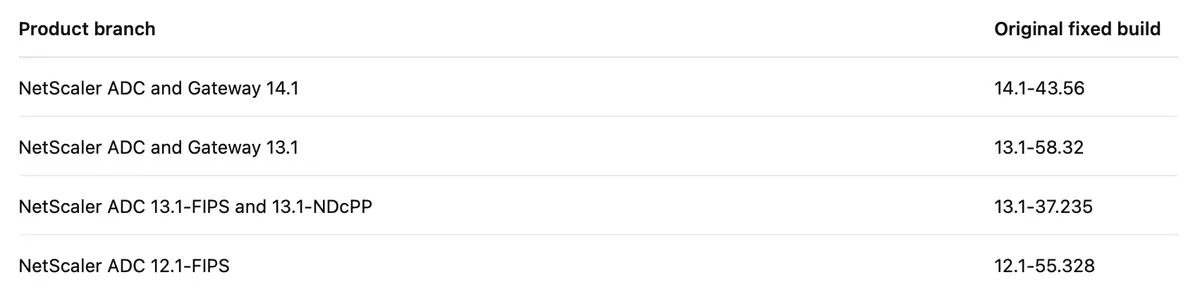
NetScaler ADC and NetScaler Gateway 12.1 and 13.0 are end of life and should be migrated to a supported branch.
These versions should be treated as the minimum builds that corrected CVE-2025-5777, not as a recommendation to install an old build in 2026.
NetScaler has disclosed additional vulnerabilities since the original CitrixBleed 2 bulletin. Organisations should therefore deploy the latest supported build that addresses CVE-2025-5777 and all subsequent security advisories applicable to their configuration.
All appliances in a high-availability pair or cluster must be updated before the session-clearing procedure is completed.
Why patching alone is not enough
Installing a corrected build prevents further exploitation of CVE-2025-5777 against the updated appliance.
It does not establish that:
- the appliance was not exploited before the update;
- no session material was disclosed;
- no stolen token remains valid;
- the attacker did not establish a second access method;
- credentials were not extracted after initial access;
- no RMM agent or tunnel was deployed.
Citrix recommends terminating active ICA and PCoIP sessions after every appliance in the HA pair or cluster has been upgraded:
kill icaconnection -all
kill pcoipConnection -all
Additional public guidance has recommended invalidating other persistent session types because ICA and PCoIP commands do not necessarily cover every cookie or session that may have been exposed:
kill rdp connection -all
kill aaa session -all
clear lb persistentSessions
These commands can disconnect legitimate users and affect production services. Administrators should validate the syntax against the deployed NetScaler version, follow an approved change procedure and coordinate the interruption with the relevant service owners.
The broader principle is non-negotiable:
Remediation must include both patching the vulnerability and invalidating potentially exposed sessions.
Investigation after patching
An organisation that operated an affected internet-facing appliance should review the interval between the likely start of exploitation and final remediation.
The investigation should include:
- Confirming every NetScaler appliance, node and cluster member was updated.
- Establishing the precise period during which the appliance was vulnerable and exposed.
- Reviewing NetScaler, AAA, VPN and authentication records.
- Identifying sessions used from multiple or unexpected source addresses.
- Checking activity originating from hosting and VPS providers.
- Correlating suspicious sessions with Active Directory, EDR and firewall telemetry.
- Searching for newly installed RMM agents.
- Hunting for
cloudflared, SSH tunnels and proxy tools. - Reviewing PsExec and remote service creation.
- Investigating access to domain controllers, hypervisors, NAS devices and backup systems.
- Searching for new accounts, modified groups and persistence mechanisms.
- Checking for evidence of credential access or data exfiltration.
- Rotating credentials and secrets where evidence indicates possible exposure.
- Preserving logs and forensic evidence before systems are rebuilt or altered.
A password reset should not be treated as a substitute for session revocation.
Similarly, indiscriminate credential rotation can cause additional disruption if service accounts and infrastructure dependencies are not understood. Credential changes should be prioritised according to evidence and performed through a controlled response plan.
Where compromise cannot be ruled out, the organisation should activate a formal incident response and digital investigation process.
What to do if the appliance cannot be patched immediately
The correct response is to install a supported fixed build as soon as possible.
When that cannot happen immediately, temporary exposure-reduction measures may include:
- removing the affected service from the internet;
- disabling vulnerable Gateway or AAA virtual servers;
- restricting access through network controls or an upstream allowlist;
- increasing logging and retention;
- monitoring the vulnerable endpoint continuously;
- blocking known malicious infrastructure;
- preparing an emergency maintenance window.
These controls do not make a vulnerable appliance secure. They only reduce the opportunity for exploitation while the update is completed.
A vulnerable remote access appliance should not remain broadly exposed because a maintenance window is inconvenient.
Hardening beyond the NetScaler appliance
CitrixBleed 2 should not be treated as an isolated patch-management issue.
The impact of a stolen gateway session depends heavily on what the user can reach after entering the environment.
Maintain an RMM allowlist
The organisation should document:
- approved remote administration products;
- the business owner of each product;
- authorised management servers;
- expected installation paths;
- permitted digital signatures and hashes;
- deployment processes;
- service names;
- network destinations;
- expiry dates for temporary support tools.
Controls should alert when:
- an unapproved RMM agent is installed;
- an approved tool is launched from an unusual directory;
- several equivalent products appear on the same host;
- a tool is installed without a corresponding change record;
- a management agent communicates with an unknown tenant.
The question is not whether remote administration software is dangerous. The question is whether the organisation can distinguish its own administrative infrastructure from an attacker’s.
Segment critical systems
A normal remote access session should not automatically provide unrestricted connectivity to:
- domain controllers;
- hypervisor management interfaces;
- backup consoles;
- NAS administration panels;
- security management servers;
- privileged management networks.
These systems should be protected through:
- dedicated administrative accounts;
- privileged access workstations;
- network segmentation;
- jump servers;
- tiered administration;
- just-in-time access;
- additional authentication requirements;
- restricted management protocols.
A compromised perimeter session should encounter multiple containment boundaries before reaching the systems that determine whether the business can recover.
Control outbound connectivity
Servers should not be able to create arbitrary outbound tunnels simply because they can access the internet.
Egress controls can restrict:
- unauthorised tunnel providers;
- external SSH connections;
- direct access to unknown proxy services;
- cloud storage not approved by the organisation;
- executable downloads from user-controlled locations;
- outbound traffic from infrastructure that does not require it.
Even where blocking is not immediately practical, central visibility makes new outbound communication significantly easier to investigate.
Manage exposure continuously
An internet-facing Gateway with a known exploited vulnerability should be prioritised above dozens of low-impact findings on isolated internal systems.
Vulnerability prioritisation should combine:
- external exposure;
- known exploitation;
- asset criticality;
- reachable privileges;
- business impact;
- available mitigations;
- exploitability;
- recovery dependencies.
This is the basis of Continuous Threat Exposure Management for regulated organisations.
It also explains why vulnerability management must go beyond periodic scanning. Hard2bit’s vulnerability management service combines continuous discovery, technical validation and risk-based remediation tracking.
Frameworks such as KEV, EPSS and SSVC can help separate urgent exploitable risk from vulnerabilities that are merely severe on paper. Our guide explains how to prioritise exploitable vulnerabilities using KEV, EPSS and SSVC.
What this means for NIS2 and DORA
For organisations within the scope of NIS2 or DORA, an unpatched internet-facing NetScaler appliance is not only a technical weakness.
It may expose deficiencies in:
- asset inventory;
- vulnerability management;
- secure remote access;
- identity and session management;
- security monitoring;
- incident response;
- business continuity;
- third-party technology risk;
- evidence retention;
- remediation governance.
NIS2 implications
NIS2 requires covered organisations to implement appropriate and proportionate technical, operational and organisational measures to manage cybersecurity risk.
A case involving CitrixBleed 2 may therefore require the organisation to demonstrate:
- when the vulnerable asset was identified;
- how it was classified and prioritised;
- when the vendor advisory and KEV entry were reviewed;
- why a remediation deadline was selected;
- when the update was applied;
- whether active sessions were terminated;
- how compromise was investigated;
- whether the incident met reporting thresholds;
- what corrective measures were implemented.
More information is available in our NIS2 cybersecurity and compliance service.
DORA implications
For financial entities, DORA places additional emphasis on ICT risk management, incident classification, resilience testing, recovery and the management of technology dependencies.
A compromised NetScaler may affect:
- remote access to critical functions;
- authentication services;
- privileged administration;
- business continuity;
- third-party service delivery;
- the confidentiality and integrity of regulated information.
The organisation must be able to connect the technical incident with its operational impact and regulatory reporting process.
Hard2bit supports financial organisations through its DORA compliance and operational resilience service.
Evidence matters
In either regulatory context, it is not sufficient to state that the appliance was eventually patched.
The organisation should retain evidence showing:
- asset ownership;
- vulnerability detection;
- risk assessment;
- remediation approval;
- implementation dates;
- version verification;
- session invalidation;
- log review;
- incident triage;
- closure criteria;
- lessons learned.
A screenshot of the new firmware version demonstrates only one part of the response.
The session is the real perimeter
VPNs, gateways and remote access appliances concentrate connectivity, identity and trust in a single internet-facing system.
That makes them valuable targets.
Anubis has not invented an entirely new ransomware model. Its affiliates have combined established techniques effectively:
- Obtain access through a valid credential or stolen session.
- Blend into normal IT activity using legitimate tools.
- Acquire additional credentials.
- Establish alternative access channels.
- Move towards critical infrastructure.
- Exfiltrate sensitive information.
- Encrypt or destroy systems when recovery options are weakest.
The right defensive assumption is no longer that the perimeter device will never fail.
The right assumption is that it may eventually fail, and the organisation must be able to:
- detect illegitimate use of a legitimate session;
- revoke that session quickly;
- identify secondary persistence;
- contain lateral movement;
- protect backups and management infrastructure;
- respond before encryption begins.
The authenticated session has become part of the perimeter and must be protected accordingly.
Was your NetScaler exposed to CVE-2025-5777?
Applying the security update is only the first step.
If an affected NetScaler Gateway remained accessible from the internet, the more important questions are:
- Was the vulnerability exploited before patching?
- Was valid session material disclosed?
- Was a session reused from an unexpected location?
- Did the attacker install an RMM agent or outbound tunnel?
- Did they reach identity, virtualisation or backup infrastructure?
Hard2bit can help your organisation:
- validate NetScaler exposure and remediation;
- analyse NetScaler, VPN, firewall, EDR and Active Directory logs;
- identify potentially hijacked sessions;
- hunt for unauthorised RMM tools and tunnels;
- contain active intrusion activity;
- assess access to critical systems;
- preserve forensic evidence;
- document remediation for NIS2, DORA, ENS or ISO 27001.
Contact Hard2bit to request a technical exposure review or activate incident response support.
Technical references
- Citrix security bulletin CTX693420
- Arctic Wolf: From CitrixBleed 2 to Cloudflared
- Arctic Wolf follow-up guidance for CVE-2025-5777
- Splunk: CitrixBleed 2 detection and mitigation
- CISA Known Exploited Vulnerabilities catalogue
Disclaimer
This article is provided for informational and educational purposes only. The technical indicators, detection queries, commands, affected versions and remediation steps described may vary depending on the NetScaler release, architecture, configuration and security tooling used by each organisation.
Before executing any command or applying changes in a production environment, verify the current guidance published by Citrix and the relevant security vendors, test the procedure in a controlled environment where possible, and follow your organisation’s change-management and incident-response processes.
The presence of an indicator, tool or network connection mentioned in this article does not, by itself, confirm malicious activity or a successful compromise. Likewise, the absence of these indicators does not rule out an intrusion. Where exploitation or unauthorised access is suspected, preserve the available evidence and seek qualified incident-response or digital-forensics support.
Frequently asked questions
What is Citrix Bleed 2 (CVE-2025-5777)?
▾
It is an out-of-bounds memory read in Citrix NetScaler ADC and Gateway appliances configured as a Gateway or AAA virtual server. An unauthenticated attacker can make the device return uninitialised memory in its responses, and that memory often holds valid session tokens. With those tokens they replay an already authenticated session, skipping both sign-in and the second factor.
Does Anubis need my password to get in?
▾
No, and that is the problem. By stealing a session token leaked by the appliance, the attacker inherits a session that has already cleared authentication and MFA, so no username or password is required. In other cases, Anubis affiliates use valid VPN credentials obtained through other means.
Does MFA protect me against this vulnerability?
▾
Only in part. MFA protects the moment of sign-in, but here the attacker never signs in: they reuse an already authenticated session. That is why the defence depends on governing the session as an asset (short lifetimes, context-based revalidation and bulk invalidation) as well as patching the appliance.
Is installing the Citrix patch enough?
▾
No. Patching closes the leak but does not evict whoever already holds a valid token. After updating you must terminate all active ICA and PCoIP sessions, rotate credentials for accounts that authenticated through the Gateway during the exposure window, and audit AAA session records for access prior to remediation.
Which NetScaler versions are affected?
▾
The flaw affects NetScaler ADC and Gateway when acting as a Gateway (VPN, ICA Proxy, CVPN, RDP Proxy) or as an AAA virtual server. Citrix released fixed builds for the 14.1 and 13.1 branches and several FIPS variants. The 12.1 and 13.0 branches are end-of-life and remain exposed, so the recommendation is to move to a supported version.
How do I detect whether a session was stolen?
▾
Useful signals include a single session used from several IP addresses, reuse of session cookies from geographies or user agents that do not match the user, repeated requests to the authentication endpoint with no successful sign-ins, and several remote administration tools appearing on the same host in a short span. The detection window sits before encryption.
What does this case mean for NIS2 and DORA?
▾
An unpatched access appliance facing a vulnerability with confirmed exploitation reads as a failure of vulnerability management and exposed-surface control. NIS2 requires risk management and notification of significant incidents; DORA adds, in the financial sector, operational resilience and third-party technology risk control. You must be able to demonstrate prioritisation and remediation with evidence.